Wednesday, 11 April 2012

Creed's Rom v2.5

7 comments

Creed's Rom v2.5


DOWNLOAD FILES 
1. CWM  http://www.mediafire.com/?duxrtp1z5uh0uaq


1.iNSTRUCTIONS

1. Make sure u have updated to  sgy to 2.3.6
2. Download the files 
3.Move this files directly to sd card
4.Reboot in recovery mode by Volume up +Home +Lock together
5.Select apply update from sd card..then select skin of CWM
6.WIPE DATA & CACHE partition
7. Apply update from sdcard. Select Creed Rom v2.5then reboot
ENJoY


Creed's Rom v2.5 Features :
*Adb/Hard Root - Access to Android Commander
*Soft Root- SU
*Pre Deodexed
*ZipAligned
*Maps With WorldWide Navigation

*Bloatware Removed
*BusyBox Support

*Message App:
-No Auto Sms To Mms Conversion
-No Receipient Limit
-Built In 5 Theme

*Touchwiz App(Samsung Home) :
-Transparency Level Increased
-Alphabetical Auto Arrange
-Landscape Orientation Intoduced

*Auto Brightness Option in Display
**Boot Animation Enabled
*Custom Boot Animation Added
*Custom Power On Sound
*Reduces Startup Time ~Less Than 13 seconds

*14 Status Bar Toggles
All 5 From Samsung(Wifi,B/T,Soung,GPS,Orientation)
Data
Lockscreen-Off
FlashLight
Shut Down Options
Reboot,Recovery & Download modes
Airplane Mode
Brightness
Auto Synchronise
Screen Timeout
(Note: Select Your Toggles and their order from Menu>Quick Panel Settings App)

*Swipe To Remove Notification 
*ICS Circle Lock (from stock)
*More Bloatwares Removed
*20mb less size that before

Read More...

Tuesday, 10 April 2012

HIDE IT PRO

Leave a Comment
 HIDE IT PRO 

DOWNLOAD LINKS


GOOGLE PLAY LINK

Hide It Pro


Description

Hide the Pictures/Videos you don't want anyone to see.
Hide Pictures and Videos in your phone. COMPLETELY FREE and UNLIMITED version. Only app in android market having full 5 stars rating with 1,000,000 downloads
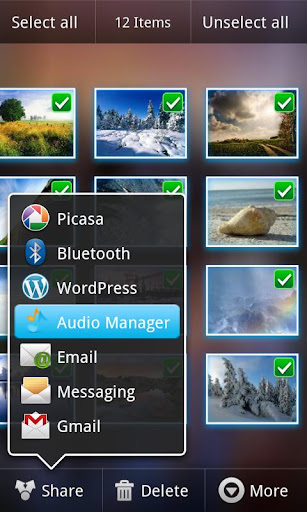
The app is cleverly disguised as "Audio Manager" in the App Drawer.

Hide the Pictures/Videos/Audio Files and Even Entire applications that you don't want anyone to see.
Features built in video player , gallery , password protection and lots more.
Disguises itself as a Audio Manager app which can be used to turn the volumes up and down. but if you Long press on the Audio Manager title the actual Hide It Pro app will launch.
You can hide Images/Videos/Audio Recordings etc. from the Phone's stock gallery by selecting all the pics that you want to hide and selecting SHARE. Applications can be hidden from within the Hide it Pro app.
Features :
0.) App disguised behind a fully functional Audio Manager
1.) Super clean and smooth UI.
2.) Proper segregation of videos/pictures audio with dashboard
3.) Categorize media into folders of your choice
4.) Batch(Multi-Select) support for hiding and unhiding files
5.) Unhide entire folders, or select multiple files to unhide at once
6.) Move files between folders
7.) Sort files by date/size/name and sort folders by count/name
8.) Thumbnails for pictures and videos on all devices
9.) Gallery features Pinch to Zoom , Double tap to zoom , One finger hold and move zoom
10.) Slideshow with Fade and Zoom effects
11.) Send/Share pictures , Get picture details and other miscellaneous options
12.) Image for seamless browsing
13.) Special optimization for low end phones. (uncheck the low memory mod from settings to get crisper pics back)
14.) Video player features play/pause/forward/rewind/next video/prev video support
15.) Ability to choose and save custom video player
16.) Disappears from recent apps list
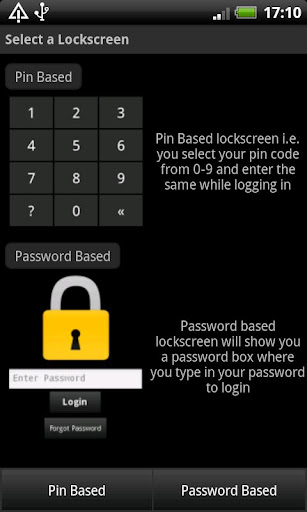
17.) Two lock screen options viz Pin and Password
18.) Escape pin/password for times when you get caught
19.) Has built in full featured file manager with ability to hide/move/share/delete multiple files
20.) Built in encryption tool(with military standard 256-bit AES encryption) to secure your most important files
21.) Special support for Incognito Browser(vBrowser) with hidden bookmarks ,and special ability like downloading from 14+ video streaming websites
22.) Full Support for Locking apps from within the app.
etc.
There are a lot more features like custom slideshow durations/slideshow order/effects , custom folder thumbnails etc. but i'll leave some of the secrets of the app to be discovered by the users ;)
Read More...

CRIME CITY

Leave a Comment
CRIME CITY 

DOWNLOAD LINKS


GOOGLE PLAY LINK

Crime City


Description

Play Crime City - featured as a top app in the Google Play Store!
Want to build a Criminal Empire and crush your rivals?
************************************
THE FIRST-EVER GRAPHICAL CRIME GAME FOR MOBILE DEVICES IS NOW LIVE ON GOOGLE PLAY!
************************************
Become the toughest Mob Boss in Crime City!
Rise through the ranks of the mafia and take over the city! Build up your hood, do jobs, and fight other players!
______________________________
TONS OF AWESOME FEATURES:
- Massively Multiplayer Online Crime Game!
- FIGHT and ROB other players LIVE!
- 150+ POWERFUL Weapons and Cars to Buy
- 80+ Real Estate Properties to Own
- 500+ Different Jobs
- 200+ Goals to Complete
- 60+ Areas to Explore
- 100+ Decorations
- Build Hotels, Casinos, Restaurants, and more!
- Steal cars, beat up people, do heists, and more!
- Invite friends to make your mafia stronger!
- Collect massive income from your properties!
- Enjoy a rich crime story
- Gorgeous graphics

ONILNE GAME 
Read More...

WALLPAPER CHANGER

Leave a Comment
WALLPAPER CHANGER

DOWNLOAD LINKS


GOOGLE PLAY LINK

Wallpaper Changer


Description

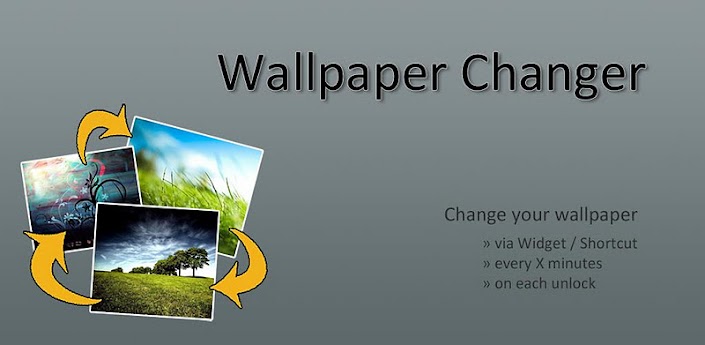
Change your wallpaper with one click or automatically every X minutes!
This app allows you to quickly change your wallpaper with one single click on a widget!
Additionally, you can enable a timer to automatically change your wallpaper on a predefined time.
Images can easily be added to the rotation list by using the Android Gallery app or a file manager like FileExpert.
Features:
- easily add images or even folders through the Android gallery & other file managers
- change wallpaper with a timer, on each lockscreen unlock or through a customizable widget
- 2 widgets: change to next wallpaper in rotation list or select the wallpaper you want to see
- ordered rotation or random wallpaper
- very low memory and battery consumption: doesnt need any background services running and is not implemented live wallpaper
- no ads
Read More...

Monday, 9 April 2012

UNICORN DASH

Leave a Comment
  UNICORN DASH

DOWNLOAD LINKS


GOOGLE PLAY LINK

Unicorn Dash


Description

Once you start to play,you won't to be stop!
Unicorn Dash is a simple action game with brilliant fun.
The unicorn running in the jungle on the sky.Keeping jump and running faster to obtain higher score.
It is a addictive game, once you start to play,you won't to be stop.You will always running and challenge yourself for higher score in anytime and anywhere
What are you waiting for? Let's goooooooooo!


Read More...

GUN AND BLOOD

Leave a Comment
 GUN AND BLOOD

DOWNLOAD LINKS


GOOGLE PLAY LINK


Gun & Blood


Description

Gun & Blood: Kill Kony
Listen up man; it is time to kill all terrorists. You are one of the strike forces to destroy anything blocked on your way.
Features:
. Weapon store: from desert eagle, UMP, AK-47 to Barrett. Enjoy the power
. Weapon upgrades: more than 100 guns accessories. From stock, scope, barrel to others you can image.
. Levels and mode: 4 big game scene , 2 game mode and more than 80 levels.
.Cool music and effects. Lots of blood and explosion.
.you may happen to encounter Kony in some level. stop him.
Read More...

Sunday, 8 April 2012

LAUNCHER 7

Leave a Comment
  LAUNCHER 7

DOWNLOAD LINKS


GOOGLE PLAY LINK


Description

A Windows Phone 7 style launcher for Android.
Unlike other current WP7 launchers (Windows Phone Android, Metro UI), this one allows you to properly modify your start screen. Just long press on a tile and drag tile where you want!


Read More...

Saturday, 7 April 2012

How to Download Android Apps APK to Your PC from Android Market or Google Play

2 comments

How to Download Android Apps APK to Your PC from Android Market or Google Play


download android market apk to pc

PART I : Setup Google Chrome to Disable SSL Error Warnings.

Step 1. Make two Shortcuts of Google Chrome on your Desktop.
Step 2. Right click one of them > Properties.
Step 3. Make sure you are on the ‘Shortcut’ Tab. Then infront of chrome.exe in Target box, Paste the following:

<Space Here>–ignore-certificate-errors
So it looks the following “C:\Users\YOUR-USERNAME\AppData\Local\Google\Chrome\Application\chrome.exe –ignore-certificate-errors”


Setup-Google-Chrome

Step 4. Press OK.
Step 5. Open the New Edited Shortcut > Open this [LINK] in the browser > Install the Extension.

PART II : Enter E-Mail ID – Password and Device ID.
Step 1. To get your Device ID, Open your Android’s Dial Pad.
Step 2. Type in the following number in the Dial Pad : *#*#8255#*#*
Step 3. It must open up GTalk Service Monitor, Scroll down until you see your E-Mail Address. You will find lines starting with JID and Device ID. Your email is JID, and your device id is a string that after android- prefix.
Example : If it shows android-123456789 , then your device ID is 123456789
gtalk service monitor

Step 4. Enter your E-Mail ID,Password and Device ID in the APK Downloader Options Page (Chrome > Tools > Extensions > APK Downloader > Options).

Options Page
PART III : Downloading APK files from Android Market or Google Play.
To download any Application’s APK from Android Market or Google Play, Go to the Install page of the App (i.e the page where it gives you the Install Button) then Look for the APK Download Button in the Address Bar of your Google Chrome, Hit it and your Download should start automatically.

APK Download Button


Read More...